01What is Omnichannel Messaging in Salesforce?
Omnichannel messaging in Salesforce means that agents can send and receive messages across multiple communication channels — WhatsApp, SMS, and potentially others — from a single unified interface inside Salesforce, with all conversations automatically linked to the relevant Contact, Lead, or Case record.
This sounds simple. In practice, most Salesforce teams are not omnichannel. They use one tool for WhatsApp (a third-party connector) and a different tool for SMS (Marketing Cloud, Twilio Flex, or a separate app). Agents switch between interfaces. Customer context is fragmented across systems. Managers run separate reports for each channel. The CRM is never fully updated.
True omnichannel messaging inside Salesforce requires a single application that handles both channels, stores all message data in unified Salesforce objects, and presents everything in one Lightning Web Component. That is what ConnectVogue provides.
02Why Omnichannel is Non-Negotiable for Enterprise Sales Teams in 2026
Customer communication preferences vary by geography, age group, and context. In South Asia and the Middle East, WhatsApp is dominant. In North America, SMS and iMessage remain prevalent. In Europe, WhatsApp is rapidly gaining ground but SMS has higher guaranteed deliverability for transactional messages. Enterprise sales teams serving global or even regional markets cannot assume a single channel.
More importantly, individual customers often use multiple channels. A B2B prospect might respond to your bulk WhatsApp template, then follow up via SMS from their office phone, then ask a support question over WhatsApp again. Without a unified console, these three conversations look like three separate customers in your CRM. With omnichannel, they are one conversation linked to one Lead record.
The operational cost of non-omnichannel is real: duplicated data entry, missed conversations, inconsistent customer experience, and inability to report on customer engagement across channels. Salesforce's own research shows that omnichannel customers have a 30% higher lifetime value than single-channel customers.
03ConnectVogue's Unified Messaging Console: How It Works
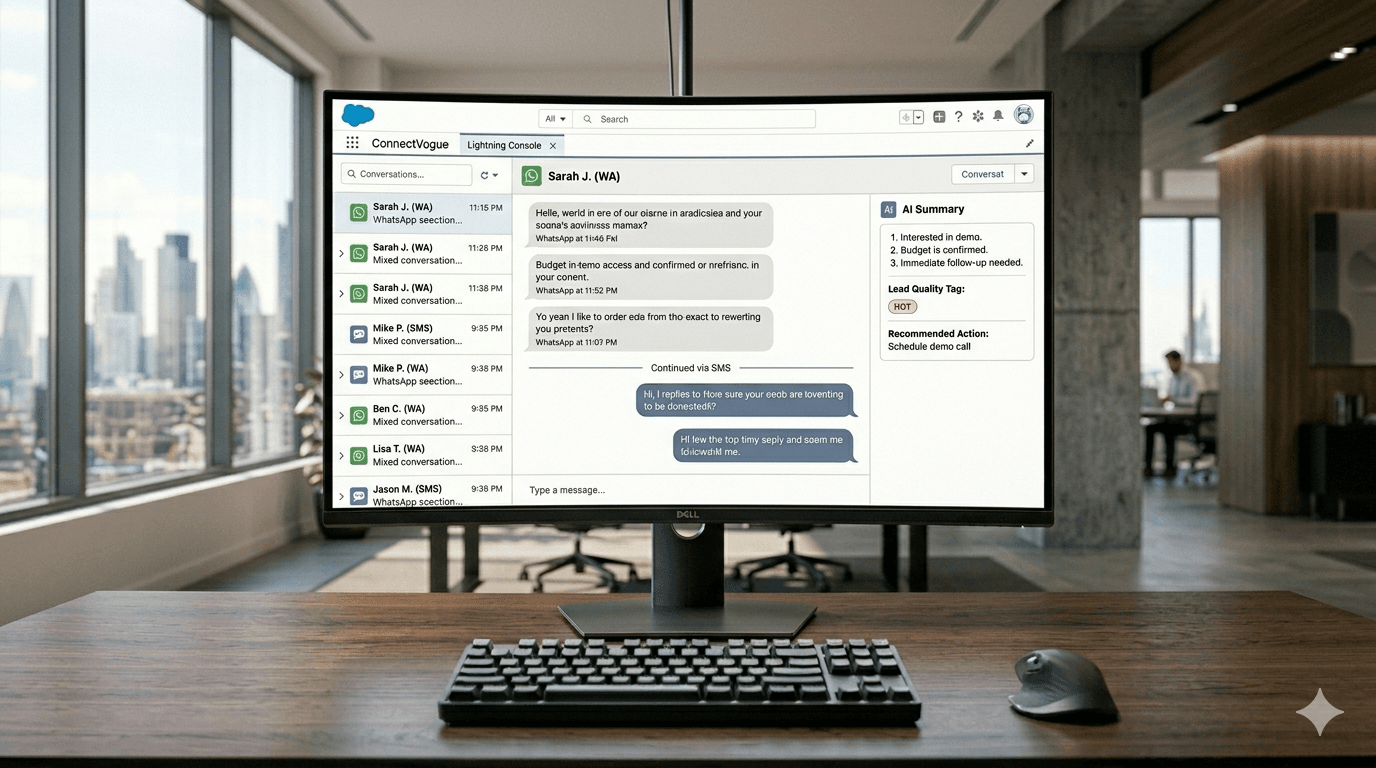
ConnectVogue's Lightning Web Component presents all WhatsApp and SMS conversations in a single Salesforce interface. The left panel shows a conversation list — each thread shows the contact name, last message preview, timestamp, and channel indicator (WhatsApp or SMS icon). Unread message counts are tracked per conversation.
Within a conversation, agents see the full message history regardless of which channel each message was sent on. A lead can receive a WhatsApp template message, reply via SMS (if WhatsApp is unavailable), and the entire thread appears in sequence. The channel for each message is indicated clearly.
The console includes AI-powered features for both channels: conversation summaries, reply suggestions, and quality ratings. These features work identically whether the conversation is WhatsApp, SMS, or a mix of both.
For inbound messages, ConnectVogue uses a 5-second polling mechanism for real-time updates — new messages appear within seconds without requiring a page refresh. This matters for customer-facing teams where response time directly impacts customer satisfaction scores.
04Building Omnichannel Automations with Salesforce Flow Builder
ConnectVogue's five Flow Builder invocable actions work across both channels. This means you can build Flows that intelligently choose the right channel based on contact data.
Example: An onboarding Flow for new customers. When a new Contact is created with a phone number: the Flow first calls 'Send ConnectVogue Message' with channel=WhatsApp to send a welcome message. If the message status returns 'failed' (the contact doesn't have WhatsApp), the Flow branches and calls 'Send ConnectVogue Message' again with channel=SMS. The customer receives their welcome message regardless of which channel they're on.
This channel-fallback pattern is especially valuable for transactional messaging (appointment reminders, payment confirmations, shipping updates) where delivery reliability is critical. It is impossible to build without a unified multi-channel messaging platform inside Salesforce.
Other omnichannel Flow patterns enabled by ConnectVogue: send campaign updates via WhatsApp template to marketing-opted-in contacts, SMS to the rest; route inbound messages to different case queues based on channel; generate AI summaries across all channels and store them in a unified conversation record.
05Unified Data Model: How ConnectVogue Stores Omnichannel Conversations
ConnectVogue's Salesforce data model is designed for omnichannel from the ground up. The CV_Conversation__c object represents a conversation thread — it has a Channel field that can be 'WhatsApp' or 'SMS', and it links to a Contact or Lead record via a lookup field.
The CV_Message__c object (a master-detail child of CV_Conversation__c) stores individual messages. Each message record has a Channel field, a Direction field (Inbound/Outbound), a Status field (Sent/Delivered/Read/Failed), and a Timestamp field.
This unified data model means that standard Salesforce reports work across both channels without any custom configuration. A report: 'All inbound messages in the last 30 days, grouped by channel, by contact region' is built in standard Salesforce Report Builder. No custom development required.
Connected to Salesforce Einstein Analytics or CRM Analytics, this data becomes the foundation for channel performance dashboards — response rates by channel, average resolution time by channel, agent productivity by channel — all built on standard Salesforce objects.
“Omnichannel isn't a buzzword — it's the difference between a fragmented view of your customers and a complete one. WhatsApp + SMS unified inside a single Salesforce console, with shared AI intelligence and Flow Builder automation, is the standard for enterprise messaging in 2026.”
Frequently Asked Questions
What does omnichannel messaging inside Salesforce actually mean and how does it work in 2026?
How does ConnectVogue unify WhatsApp Business API and Twilio SMS in a single Salesforce interface?
What Salesforce Flow Builder automations can I build with a unified WhatsApp and SMS platform?
Keep Reading
All InsightsWhat Happens to Your WhatsApp Data When You Use 360SMS? A GDPR and Data Residency Audit
Every inbound WhatsApp message routed through a middleware vendor makes that vendor a GDPR data processor. Here is exactly what that means for Salesforce teams in the EU, UK, and UAE — and how native architecture eliminates the risk entirely.
360SMS Alternative in 2026: Why Salesforce Teams Are Switching to BYOK Architecture
360SMS dominates the Salesforce AppExchange with 60,000+ users. But for scaling teams, BYOK architecture cuts messaging costs by 40–60%, keeps all data inside your org, and delivers multi-provider Agentic AI that 360SMS cannot match.